Co|See vs. spreadsheets for tracking selections.
Spreadsheets are where most selection lists start. On a remodel or custom build, they stop keeping up once photos, changes and a dozen people get involved.
Spreadsheets: Google Sheets, Excel and Numbers
Where spreadsheets stop keeping up
The photo lives somewhere else.
A cell holds a link or a model number. The photo of the actual tile is in someone's camera roll.
Versions multiply.
The builder has the copy you emailed last month. The designer has this week's. Nobody's sure which one is final.
It's hard to use on site.
Forty columns don't fit on a phone, and the job site rarely has signal.
Side by side.
| Compared | Spreadsheets | Co|See |
|---|---|---|
| Finding a selection later | Scroll or filter, if you know the row | Search the project, or open the room |
| The product | A link in a cell | A photo of the actual product, plus the link |
| Finish, size and install notes | A column, if someone filled it in | On the item, next to the photo |
| What's final | A status column someone has to update | Marked on each selection |
| Who sees what | Everyone with the link sees every tab | Each person gets the access you choose |
| On the job site | A laptop, or pinching and zooming on a phone | Your phone, with or without signal |
| Progress | Photos live somewhere else | A photo on each item as it's installed |
| Questions from the trades | Texts and emails about row 47 | Comments on the item they're about |
| After you move in | A file you'll have to dig for | The record of your house |
In Co|See
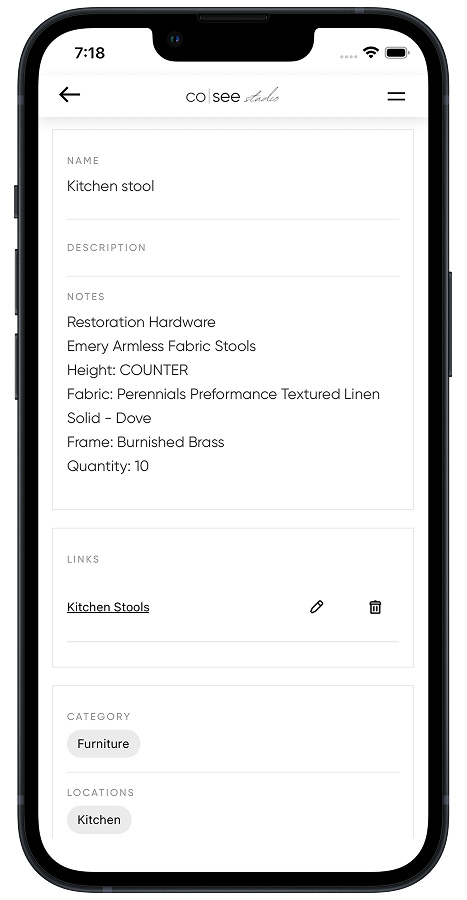
Each row becomes a selection you can see.
The photo, the finish, the size and the install notes sit together, organized by room and category, on any phone.
When a spreadsheet is the right tool
- Budgets and math: totals, allowances and loan draws.
- Bulk edits across hundreds of rows at once.
- Sharing with someone who won't open anything else.
Import the spreadsheet into Co|See for the selections, and keep it for the math.
Moving from a spreadsheet
Import your spreadsheet or PDF directly. Each row comes in as a selection, ready for its photo, notes and progress, so nothing gets retyped.
Start your project freeQuestions people ask.
Is there an alternative to spreadsheets for tracking remodel selections?
Yes. Co|See keeps each selection's photo, finish, size and install notes together, by room, and shows everyone on the project the current version. Keep the spreadsheet for budgets and math.
Can I import my selection spreadsheet into Co|See?
Yes. Import a spreadsheet or PDF directly and each row becomes a selection. Nothing gets retyped.
Should I stop using a spreadsheet for my remodel budget?
No. Spreadsheets are good at totals, allowances and draws. Use Co|See for what each selection is, where it goes and whether it's final.
Put the selections where everyone can find them.
Start with the ones you already have. Import a spreadsheet or PDF, or take a photo of the next thing you choose.